Every lease deadline & payment on one wall calendar
Expiries, break options, renewal decisions, rent reviews, reassessments and lease payments, laid out two months at a time across your whole portfolio. Filter by event type, scope to a single entity, or roll subsidiaries up to the parent automatically.
The lease deadlines that matter, before they bite
A missed break date or rent-review deadline is a real commercial cost, and these dates are easy to lose in a spreadsheet. AuditLease pulls every lifecycle event and every scheduled payment from your register and lays them out on a wall calendar, so you can see what is coming up this month, next month, and the month after that.
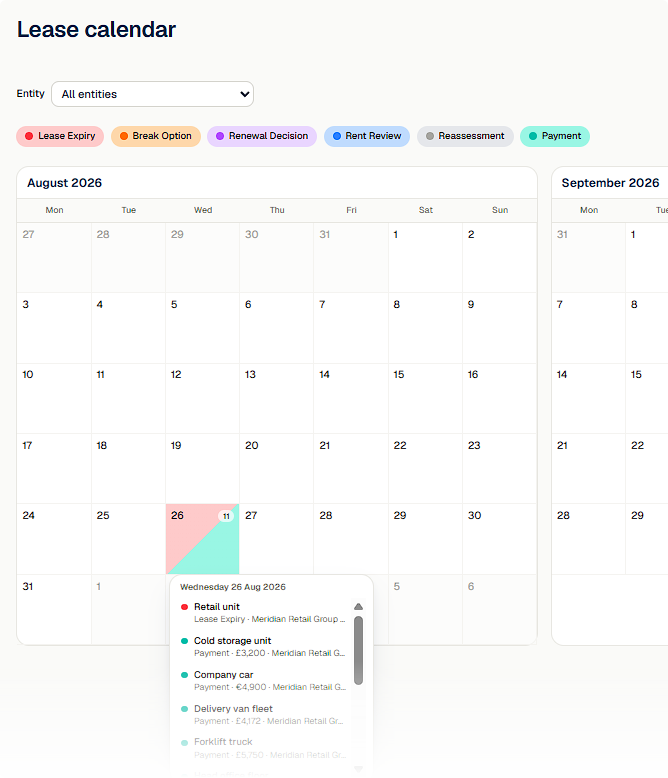
Days with activity are filled with the colour of the event type (a gradient if several types fall on the same day); hovering shows the detail (lease, entity, event type and, for payments, the amount) and clicking opens the lease.
Two-month wall calendar
See August and September side by side
Two months at a time, with chevrons paging the pair forward and back. Each event type has its own colour pill at the top; click one to hide that type from the grid. The entity selector scopes the feed; if the selected entity is a parent, a group toggle folds every subsidiary in automatically.
Hover a day to see exactly what is happening: lease name, entity, event type, and payment amount where it applies. Click any item to jump straight to the lease.
What the calendar covers
Six event types, colour-coded
Lease expiry, break option, renewal decision, rent review, lease reassessment and scheduled payments, each with its own colour, on the grid and on hover.
Lease payments with amounts
Scheduled payments appear on the day they are due, with the amount formatted in the lease’s native currency. Distinguish payment days from event days at a glance.
Entity scope + group toggle
Scope to a single entity, or pick a parent and toggle "Include subsidiaries" to roll every entity below it into one calendar, the same hierarchy your group reports walk.
Filter pills
Click a pill to hide or show a type. Counts and day-fills update instantly, stripping the noise back to what you care about today.
Hover detail, click through
Hover any day to see every event and payment on it; click any item to open that lease detail in a new tab. No more cross-referencing spreadsheets to find the lease.
Backed by the register
The calendar reads straight from the lease register and the active payment schedules, so what you see is exactly what your records say, with no separate calendar to keep in sync.
Related features
Never miss a lease deadline again
Free plan includes the calendar for up to 3 leases. No credit card required.